Information
Role
Team Size
Time Frame
Engine
Game Developer
4 Developers
3 Months
MonoGame C#

Contributions
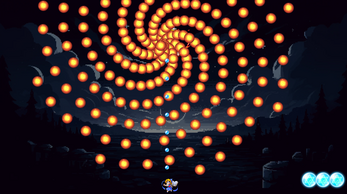
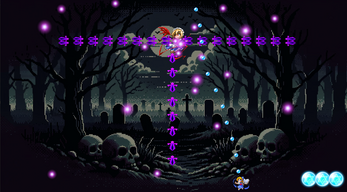
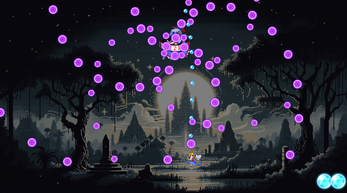
Danmaku Rhapsody was the final project of our first year of study, developed by a team of four students. Built in MonoGame using C#, it is a bullet-hell shooter featuring fast-paced movement, challenging enemy waves, and intense boss battles. The game was successfully published on Itch.io, marking our first released title.
My contributions to the project included a mix of design, asset management, and programming work. Although I was still early in my coding journey, working on this game gave me valuable experience in collaborating on a larger project and learning about real-world development challenges.
- Maintaining and updating the Game Design Document.
- Contributing to the core game design and mechanics planning.
- Programming the player movement system, ensuring smooth and responsive controls.
- Assisting in asset selection and optimization to match the game’s aesthetic.
- Designing and implementing the third boss fight, including its unique attack patterns and coding its behavior.
While I contributed to the game’s code, I recognize that the programming done during this project was far from perfect. Through this experience, I realized how important it is to:
- Use proper programming patterns (such as avoiding repetition and writing modular, clean code).
- Design systems carefully before starting to code.
- Focus on scalability and maintainability rather than just “making it work.”
Danmaku Rhapsody helped me grow significantly as a developer and gave me a strong foundation to continue learning better practices for future projects.
Code
Player Movement and Bullet Management
This class handles the player’s smooth, mouse-following movement and basic bullet management. Movement uses linear interpolation (lerp) for smooth, responsive behavior while clamping the player within screen bounds. The player maintains a list of bullet instances (LBL objects) that update each frame to match the player’s current position, preparing them for firing behavior. The design ensures clear separation of movement and projectile logic for scalability and easier future upgrades, such as multi-shot mechanics or different bullet types.
Player Movement Code
public class Player : SpriteGameObject
{
    protected MouseState currentMouseState, previousMouseState;
    protected Texture2D bulletTexture;
    public List<LBL> playerBullets;
    public float attackSpeed;

    public Player() : base("Images/Characters/Blue player", 0, "Player", 0, 26, 25, 6, 6)
    {
        bulletTexture = GameEnvironment.AssetManager.Content.Load<Texture2D>("Images/Bullets/PlayerBullet");
        attackSpeed = 0.1f; // Default attack speed, adjustable if needed
        playerBullets = new List<LBL>();

        // Initialize a default bullet
        LBL bullet = new LBL(bulletTexture, new Vector2(position.X + Width / 2, position.Y), 15, attackSpeed, 10f, 0, 0, 3 * MathHelper.PiOver2, 0);
        playerBullets.Add(bullet);

        Visible = true;
        currentMouseState = Mouse.GetState();
        position.X = currentMouseState.X;
        position.Y = currentMouseState.Y;
    }

    public override void HandleInput(InputHelper inputHelper)
    {
        base.HandleInput(inputHelper);
        previousMouseState = currentMouseState;
        currentMouseState = Mouse.GetState();

        float lerpFactor = 0.2f; // Smooth movement factor

        int targetX = currentMouseState.X;
        int targetY = currentMouseState.Y;

        position.X += (targetX - position.X) * lerpFactor;
        position.Y += (targetY - position.Y) * lerpFactor;

        position.X = Math.Clamp(position.X, -BoundingBoxLeft, GameEnvironment.Screen.X - BoundingBoxLeft - BoundingBoxWidth);
        position.Y = Math.Clamp(position.Y, -BoundingBoxTop, GameEnvironment.Screen.Y - BoundingBoxTop - BoundingBoxHeight);
    }

    public override void Update(GameTime gameTime)
    {
        foreach (var bullet in playerBullets)
        {
            bullet.position = new Vector2(position.X + Width / 2, position.Y);
            bullet.Update(gameTime);
        }
    }
}
Boss3 – Multi-Pattern Boss Behavior
This class defines a boss enemy with 10,000 HP that attacks using randomized, non-repeating attack patterns. Every 5 seconds, the boss selects a new attack from four different types without repeating the last one. Each attack is implemented in a modular way via Attack1(), Attack2(), etc. The boss can also spawn multiple bullet instances (LBL objects) and updates and draws them alongside itself. Movement towards target positions is handled smoothly using normalized direction vectors. The structure is designed to allow flexible boss behavior and easy expansion with new attack patterns.
Boss 3 Manager
public partial class Boss3 : SpriteGameObject
    {
        protected Texture2D bulletTexture;
        public List<LBL> BossBullets;
        public int HP = 10000;
        public bool hitAble = true;
        private float timer = 0;
        private int lastAttack = 0;
        private int attack = 0;
        private bool attacking = false;
        private bool isAttackInitialized = false;

        LBL a, b, c, d, e, f, g, h, i, j, k, l;

        Random random;

        public Boss3() : base("Images/BOSS/BOSS3/Boss3", 0, "Boss3", 0, 0, 0, 94, 120)
        {
            bulletTexture = GameEnvironment.AssetManager.Content.Load<Texture2D>("Images/Bullets/Boss3Bullet");
            BossBullets = new List<LBL>();

            position.X = GameEnvironment.Screen.X / 2 - Width / 2;
            position.Y = 100;

            random = new Random();
        }

        public override void Update(GameTime gameTime)
        {
            timer += (float)gameTime.ElapsedGameTime.TotalSeconds;

            foreach (var BossBullet in BossBullets)
            {
                BossBullet.Update(gameTime);
            }

            if (timer >= 5 && attacking == false)
            {
                GetRandomAttack();
                attacking = true;
                timer = 0;
            }
            switch (attack)
            {
                case 1:
                    Attack1(gameTime);
                    break;
                case 2:
                    Attack2();
                    break;
                case 3:
                    Attack3();
                    break;
                case 4:
                    Attack4();
                    break;
                default:
                    break;
            }
        }

        public override void Draw(GameTime gameTime, SpriteBatch spriteBatch)
        {
            sprite.Draw(spriteBatch, GlobalPosition, Origin, scale, shade);
            foreach (var BossBullet in BossBullets)
            {
                BossBullet.Draw(spriteBatch);
            }
        }

        private void GetRandomAttack()
        {
            int min = 1;
            int max = 4;
            Random random = new Random();
            int newAttack;

            do
            {
                newAttack = random.Next(min, max + 1);
            } while (newAttack == lastAttack);

            attack = newAttack;
            lastAttack = attack;
        }

        private void MoveToPosition(Vector2 target, float speed)
        {
            Vector2 direction = target - position;
            if (direction.LengthSquared() > speed * speed)
            {
                direction.Normalize();
                position += direction * speed;
            }
            else
            {
                position = target;
            }
        }
    }
Attack 1 – Rotating Bullets, Direction Switch
Spawns 8 bullets in a circle around the boss that rotate continuously around it. Every 2 seconds, the rotation direction switches between clockwise and counterclockwise. After 10 seconds, the attack ends and all bullets are deactivated.
Attack 1
public partial class Boss3 : SpriteGameObject
    {
        private bool isClockwise = true;
        private float switchDirectionTimer = 2f;
        private float switchDirectionInterval = 2f;
        private LBL[] bullets1 = new LBL[8];
        private void Attack1(GameTime gameTime)
        {
            if (!isAttackInitialized)
            {
                float initialAngle = 0;
                float angleIncrement = MathHelper.PiOver4;

                for (int i = 0; i < bullets1.Length; i++)
                {
                    bullets1[i] = new LBL(bulletTexture, new Vector2(position.X + 175, position.Y + 185), 40, 0.1f, 3f, 0, 0, initialAngle, 0);
                    bullets1[i].isActive = true;
                    BossBullets.Add(bullets1[i]);
                    initialAngle += angleIncrement;
                }

                isAttackInitialized = true;
            }
            else
            {
                foreach (LBL bullet in BossBullets)
                {
                    bullet.bulletAngle += isClockwise ? -0.1f : 0.1f;
                }
                switchDirectionTimer -= (float)gameTime.ElapsedGameTime.TotalSeconds;
                if (switchDirectionTimer <= 0)
                {
                    isClockwise = !isClockwise;
                    switchDirectionTimer = switchDirectionInterval;
                }
            }

            if (timer >= 10)
            {
                foreach (LBL bullet in BossBullets)
                {
                    bullet.isActive = false;
                }

                attacking = false;
                timer = 0;
                attack = 0;
                isAttackInitialized = false;
            }
        }
    }
Attack 2 – Dual Layer Spinning Bullets
Fires two layers of bullets: a fast inner layer and a slower outer layer. Both layers rotate around the boss at different speeds (inner slower, outer faster). The attack continues spinning the bullets for 10 seconds before ending.
Attack 2
public partial class Boss3 : SpriteGameObject
    {
        private LBL[] bullets2 = new LBL[8];
        private float[] angles = { 0, 1, 2, 3, 0, 1, 2, 3 };
        private float[] interval = { 0.3f, 0.3f, 0.3f, 0.3f, 0.5f, 0.5f, 0.5f, 0.5f };
        private float[] speed = { 3f, 3f, 3f, 3f, 2f, 2f, 2f, 2f };

        private void Attack2()
        {
            if (!isAttackInitialized)
            {
                for (int i = 0; i < bullets2.Length; i++)
                {
                    bullets2[i] = new LBL(bulletTexture, new Vector2(position.X + 175, position.Y + 185), i < 4 ? 40 : 30, interval[i], speed[i], 0, 0, angles[i] * MathHelper.PiOver2, 0);
                    bullets2[i].isActive = true;
                    BossBullets.Add(bullets2[i]);
                }
                isAttackInitialized = true;
            }
            else
            {
                for (int i = 0; i < bullets2.Length; i++)
                {
                    bullets2[i].bulletAngle -= (i < 4) ? 0.1f : 0.2f;
                }
            }

            if (timer >= 10)
            {
                foreach (var bullet in bullets2)
                {
                    bullet.isActive = false;
                }
                attacking = false;
                timer = 0;
                attack = 0;
                isAttackInitialized = false;
            }
        }
    }
Attack 3 – Movement and Rotating Bullet Attack
The boss moves to a target point, spawns a ring of bullets, and spins them while staying in place. After 10 seconds of spinning, the boss returns to its original position. Bullets are deactivated once movement completes, resetting the attack cycle.
Attack 3
public partial class Boss3 : SpriteGameObject
    {
        private int state = 1;
        private Vector2 startTarget = new Vector2(GameEnvironment.Screen.X / 2 - 45, 100);
        private Vector2 endTarget = new Vector2(175, 180);

        private void Attack3()
        {
            if (!isAttackInitialized && state == 2)
            {
                InitializeBullets3();
            }
            else
            {
                switch (state)
                {
                    case 1: // Moving to target position
                        HandleMoveToPosition(endTarget, 6f, 2, false);
                        break;

                    case 2: // Starting the attack
                        StartAttackSequence();
                        break;

                    case 3: // Stopping and returning to the original position
                        HandleReturnToStart();
                        break;
                }
            }
        }

        private void HandleMoveToPosition(Vector2 target, float speed, int nextState, bool checkTimer)
        {
            MoveToPosition(target, speed);

            if (Vector2.Distance(position, target) <= 5 && (!checkTimer || timer >= 5))
            {
                state = nextState;
                timer = 0;
            }
            RotateBulletReset();
        }

        private void StartAttackSequence()
        {
            RotateBullets();
            if (timer >= 10)
            {
                timer = 0;
                state = 3;
                DeactivateBullets();
            }
        }

        private void HandleReturnToStart()
        {
            MoveToPosition(startTarget, 6f);

            if (Vector2.Distance(position, startTarget) <= 5 && timer >= 5)
            {
                ResetAttack();
            }
            RotateBulletReset();
        }

        private void InitializeBullets3()
        {
            var initialPositions = new Vector2(position.X + 175, position.Y + 185);
            var angles = new float[] { 2, 3, 4, 5, 6, 7 };
            var interval = new float[] { 0.15f, 0.05f, 0.05f, 0.1f, 0.1f, 0.1f };
            var sizes = new int[] { 40, 40, 40, 20, 20, 20 };
            var bullets = new LBL[6];

            for (int i = 0; i < bullets.Length; i++)
            {
                bullets[i] = new LBL(bulletTexture, initialPositions, sizes[i], interval[i], 3f, 0, 0, angles[i] * MathHelper.PiOver4, 0)
                {
                    isActive = true
                };
            }

            BossBullets.AddRange(bullets);
            isAttackInitialized = true;
        }

        private void RotateBullets()
        {
            for (int i = 0; i < BossBullets.Count; i++)
            {
                BossBullets[i].bulletAngle -= (i < 3) ? 0.08f : 0.18f;
            }
        }

        private void RotateBulletReset()
        {
            for (int i = 0; i < BossBullets.Count; i++)
            {
                BossBullets[index: i].bulletAngle = 0;
            }
        }

        private void DeactivateBullets()
        {
            foreach (var BossBullet in BossBullets) BossBullet.isActive = false;
        }

        private void ResetAttack()
        {
            DeactivateBullets();
            attacking = false;
            timer = 0;
            attack = 0;
            state = 1;
            isAttackInitialized = false;
        }
    }
Reflection
In these attacks, I noticed a few things that could be improved. I accidentally repeated the Boss3 class declaration for each attack, even though it only needs to be declared once. Some of the bullet spawning and handling code is duplicated between the attacks, and could be combined into helper functions to make the code cleaner.
I also used some hardcoded values (like timers, angles, and speeds) that would be better stored as constants for easier balancing later. Naming could be improved too, since things like bullets1 and bullets2 aren’t very descriptive.
In GetRandomAttack(), I created a new Random instance even though one already existed in the class, which isn’t necessary.
Finally, in Attack 3, the movement and bullet behavior are a bit mixed together; separating them would make the code easier to manage. Using an enum for attack states (instead of just numbers) would also make it more readable.